Thursday, February 21, 2013

Hibernate tutorial


Hibernate is a powerful high-performance Object/Relational persistence and query service for Java applications. In Hibernate it maps object oriented classes to the database tables and also provides data query. It’s so simple and easy.

Before come to Hibernate, I’ll get some time to explain where it is come from.

There are some mismatches, when mapping object oriented classes and relational databases. Here we want to use a technique to map them correctly. So Object Relational Mapping here. Object Relational Mapping is used for avoid following mismatches between   object oriented classes and relational data bases.

There may be more classes than the number of corresponding tables in the data base. Relational data bases do not defined any similarity to inheritance which is main concept in OOP. RDBMS only has concept of sameness while OOP has object identity and object equality. RDBMS is used foreign key for association columns while OOP is used object reference. The method of access to object class and RDBMS is different.

For more clear, I’ll give you a example for class and data base table.
public class Student {
   private int id;
   private String name;
   private int telno;
   

   public Student() {}
   public Student(String name,int telno) {
      this.name = name;
      this.telno = telno;
   }
   public int getId() {
      return id;
   }
   public String getName() {
      return name;
   }
  
   public int getTelno() {
      return telno;
   }
}

Above program is Java student class and By creating a object we are going to store data in following table.

create table STUDENT (
   id INT NOT NULL auto_increment,
   name VARCHAR(30) default NULL,
   telno INT  default NULL,
   PRIMARY KEY (id)
);

There are some advantages over traditional JDBC (Java Data Base connectivity). There are no need to deal with data base implementation. It hides details of SQL queries from OO logic. Entities are based on business concepts rather than database structure. It is developed application faster.

There are many Java ORM Frameworks. Here we use Hibernate framework which provide services to store and retrieve objects from relational data base.

Hibernate exist between java objects and database server to handle object –relational mechanisms and patterns by mapping java classes to database tables and from java data types to SQL data types.


Hibernate supports RDBMS like MySQL, Oracle, HSQL Database Engine, DB2/NT, PostgreSQL, FrontBase, Microsoft SQL Server Database, Sybase SQL Server , Informix Dynamic Server and technologies like J2EE, Eclipse plug-ins, XDoclet Springand, Maven.


Friday, February 1, 2013

Introduction to Python for Beginner


Python is a dynamic interpreted object oriented scripting language. Python can execute in 2 modes. There are, Interactive mode using the terminal or command prompt and  scripting mode using “.py”  file. The most powerful advantage in python is source code does not declare the types of variables or parameters or methods. According to your syntax of initializing of variable, compiler understand the variable is which type. So codes are more flexible and short. Other important thing is, there no “{}”  to define indentation. Indentation takes place by tab spacing. Be careful when coding you have to maintain the indentation correctly. If you unable to maintain the indentation correctly, your Programming may execute different way. Now I think you have the background knowledge. So let’s begin with installation.

Installation
You can download in here. If you are using CentOS , it comes with python 2.6 version. In Linux terminal
You can find the python installed location by command “ whereis python”.


You have to set the Environmental PATH variable.
If you are programming with terminal you have to convert  to the python interpreter by typing “python” command.


To terminate the Python we should use Ctrl + D.

Install Eclipse plugin for Python


If you are using IDE ,You have to use plugin for python. Let me describe it using Eclipse IDE.
1.Open Eclipse IDE à Help in menu bar à Eclipse Marketplace.


2.Type “pydev” in find field and click go. Then click the “Install” button in “ PyDev – Python IDE for Eclipse”.


3.Click Window in menu bar-à Preferences àPyDevàInterperter- PythonàNew.


5.Give any name as “Interpreter Name” and Browse where the  python executable file(python.exe) is to “Interpreter Executable” and OK  .If it found the executable file It will show you.Then click OK.


6.Then to open the perspective, WindowàOpen Perspective à Other àPyDevàOK.


Now Environment is ok.
First you have to create a project.
File à New àPyDev Project àGive a project name. àFinish.


Then you have to make a new python file.
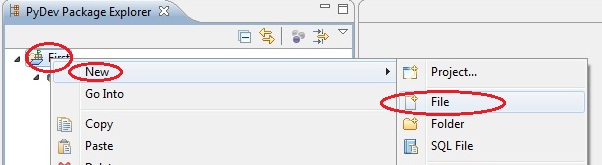
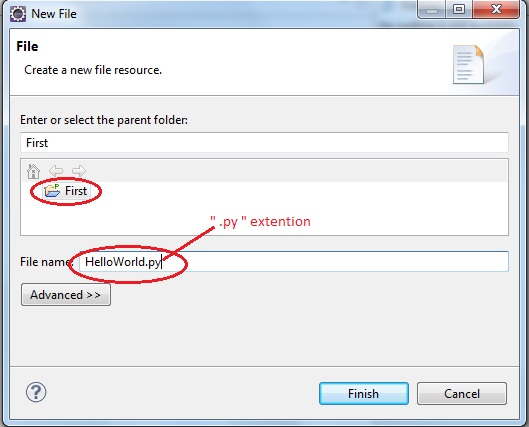
Select the project àNew à Fileàtype a file name with “.py ”extention. à Finish.


This is the time for coding.get your hands dirty with coding.

Thursday, January 31, 2013

Introduction to Java for developers


 Java is a high level Programming language. Java program interpreted by a program called Java Virtual Machine (JVM). Before it is interpreted by the JVM, the java compiler compile java source codes contain in java file into class file. Java is a platform independent language. Because of the JVM. And also it is an Object Oriented Language.


You can use editor like Notepad or Notepad++ or IDE like NetBeans or Eclipse.

In java source file there can be three type of top level piece of codes. They are Package declaration, Import statement and Class statement. In .java file there should be only one public class declaration and that class name should be the name of the file. It is legal to have many classes in a file but exactly only one public class.

Package is used to organize the file into different directories according to their functionality, usability and category. Same class name cannot use again in a package. But same name can use in different package.

If you want access a class in different package, you have to use the full qualified name for that class.
            Eg:- public class exercise{
           
                        java.util.ArrayList myArray = new java.util.ArrayList();
    }

But once you import the package in to your class no need to use full qualified name.
Eg:-import java.util.*;
                   public class exercise{
                                 ArrayList myArray = new ArrayList();
                                public static void main(String[] arg){
                                }
                   }


Class is a temple (blue print) for objects. It has class declaration which contain name of the class and some other attributes such as access level and class body which contains methods, variables and program logic.
An object is created from a class and that process is called as instantiation.

Methods denote the behaviors of the object. It also contains the method declaration and method body.
Method name and parameter list together consider as method signature.


Main method is the entry point for the program.
public static void main(String[] arg){
                       
            }

When program execute, it search for main method. When you type some arguments in execute command, I’ll take for arg string array.

Variable represent a value in the memory and you can change the value without changing the variable’s name.It has a declaration which contains the data type and variable name.
            int count = 10;
            String name = "Kamal";

There are two main data types. They are primitive and non primitive data types. Non primitive data types are infinity and they are user defined. Primitive variables contain the primitive values while non primitive values hold non primitive values.


Each variable has a given name by the programmer. That name is called as identifier.  There some rules for identifier to became a legal identifier. The first character of the identifier must be a letter, a dollar sign($) or underscore(_) .A character other than first on, may be a letter, a dollar sign, a underscore or a digit.  

Key words are reserved words. You can not use key words as identifiers. All the key words are lower cases. Followings are key words.

abstract
continue
for
new
switch
assert
default
goto
package
synchronize
break
do
if
private
this
byte
double
implements
protected
throw
case
else
import
public
throws
catch
enum
instanceof
return
try
char
extends
int
short
transient
class
final
interface
static
void
const*
finally
long
strictfp
volatile
boolean
float
native
super
while

There are some important things you have to know before your hands get dirty with codes.

Monday, January 28, 2013

UML Diagrams overview and Relationship.


“A picture is worth a thousand words”.
 In software Industry, communication plays a very important role. Solution of UML diagram really fits on that.UML stands for Undefined Modeling Language. It represents the whole software system in pictorial language using different diagrams.
All   diagrams can be categorized as follows,


Elements can not exist along. There are some kinds of relationships among those elements. There are,
  •         Generalization
  •         Association
  •     Dependency    


Generalization:
It is also called as Inheritance. It represent the “Is a” relationship. It is denoted by “ "
Example:-
Saving Account is an Account.

UML diagram:-


Java Implementation:
Class Account{
}
Class SavingAccount extends Account{
}


Association:-

It represents “has a” relationship. If there is one way Association that has an only one class is denoted by  ““  and if it is bi- directional or multi- directional, it is denoted by “  “.

Example01:-
                Student has a book.
UML Diagram:-


Java Implementation:-
            Class Student{
                Book myBook;
}
Class Book{
}

Example02:-
                A student has 1 or more books.

UML Diagram:
               
Java Implementation:-
            Class Student {
                Book[] myBook;
}
Class Book{
                Student ownStudent;
}


Dependency:-
It represents the “Uses a” Relationship and It is denoted by “ “.
Example:-
Shelf use books

UML Diagram:-


Java Implementation:-
             Class Shelf{
                        Public string placeOrder(Book mybook){
           # returns the location of book according to the book
}
}
Class Book{
}

                    
Next post will continue the diagrams.                    

The Hypervisor

 The hypervisor is a piece of software that runs on top of hardware infrastructure that creates a virtualization platform. The hypervisor a...